Social comments on my blog

I had a comments section on this blog since the beginning. I always felt like a comments section was kind of a requirement for a blog: it’s not just a website where you publish posts, it’s a website where you publish posts and other people can comment on them. I strongly disagreed with bloggers who openly declared that they’re removing comments from their blog because their blog is not a place for others to add their remarks, and that they can always write to the author on Twitter if they want to contact them.
But one obvious problem with comments on a blog, which got worse and worse over time, was spam. People tried to solve it e.g. with captchas, though as the bots got smarter, captchas had to get more complicated and annoying.
For a very long time, I had a super simple captcha in the comment form that just asked: “Are you a human? (yes/no)”. You just had to write “yes” in the text field. And for a very long time it was enough – obviously it’s trivial to make a bot add an additional query parameter, the point was that nobody would think about it when writing generic spambots, and my blog isn’t famous so the bot authors wouldn’t have come across it.
Things got worse around 2018-19. I started getting comments (I had email notifications for them) that were spam that obviously got around the captcha. So I started tweaking the captcha, adding multiple slightly more complex questions, but still such that you could answer them if you’re a developer or an Apple user – “What’s the name of the Mac operating system”, “Who is currently the CEO of Apple”, and so on. But it only worked for some time, and then I started getting spam again, while making the questions progressively harder over time:
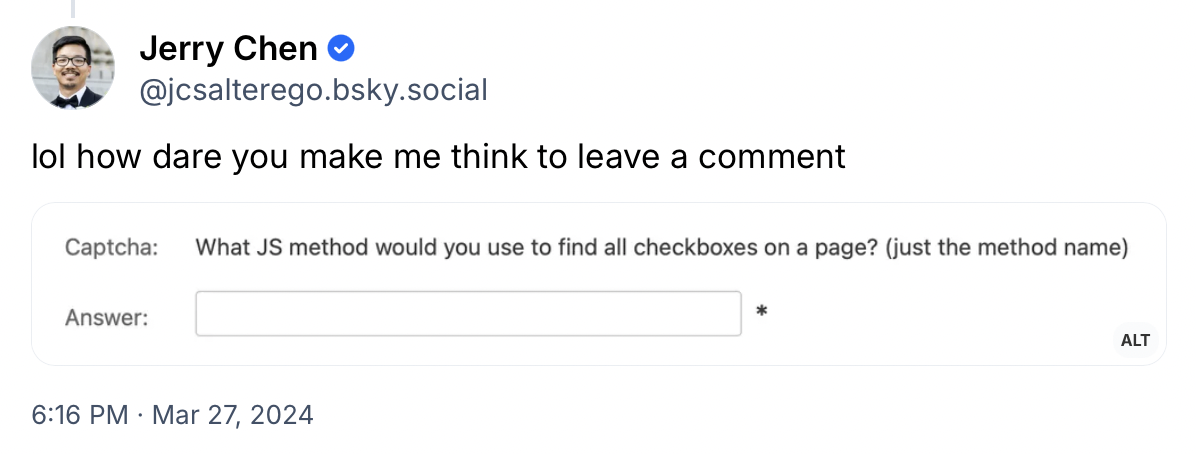
At some point I figured that this had to be actual people, rather than bots, adding the comments (talking in general, not about Jerry here above), people sitting at a computer, browsing websites and filling the forms by hand, because there was no way a bot would figure out that the question was a captcha and that it had to google for a name of a function (note, this was in pre-AI times). The comments were usually either in Russian or Ukrainian, or linking to some local service companies in some random small town in the US.
There was no way I could out-captcha an actual human that can google for an answer. But it wasn’t a huge problem, I didn’t get many of those comments, and it was fairly easy to filter them out still by content, so I didn’t bother changing the system further.
But here’s the thing: it’s not 2010 or 2018 anymore, and some other things have changed in the meantime too. I think it’s a bit of a truism that blogs and “blogosphere” aren’t what they used to be 15+ years ago. People post their thoughts on social media, Instagrams, Facebooks, LinkedIns, Substacks, record Tiktoks, YouTube videos or podcasts. Reading and writing blogs and commenting on them is a very niche hobby, let’s face it. After 2020-21, when for a while I was getting a ton of comments about my Corona Charts site, I got just a handful of comments in total on newer posts. Discussions now happen in threads on social media. The truth is that for many years now, this comment form here was mostly a way for a landscaping company in Delaware County to advertise their services, and not much more than that.
So as I saw more and more people on Bluesky implementing a way of showing Bluesky threads as comments on their blog, I knew I’d eventually end up doing the same.
The implementation
I thought a bit about how to approach this, the pros & cons of various ways of doing it (client-side vs. server-side etc.), but in the end I decided to do it like almost everyone else seems to have done it: a client-side JS code that loads comments from the getPostThread API on the Bluesky AppView server and renders them live at runtime. This solution:
- is the simplest way to run it technically (no firehose client etc.)
- makes new comments appear almost instantly on the site (for new visitors, not literally live)
- automatically applies moderation, either from Bluesky (removing clear spam) or from me (hiding offensive comments using a threadgate)
- and I didn’t feel like it was important to have the comments embedded in the loaded HTML, in fact it’s probably better if they aren’t (for SEO/spam reasons)
I also knew I wanted to include comments from Mastodon too, so that was also the simplest way to get comments from both sources and merge them.
The one tricky part is not loading the threads, but knowing which threads to load: the linking of specific blog posts to specific Bluesky/Mastodon posts about them. I didn’t want to have to do this manually, and looking up the post at runtime every time would be too much of a performance hit, so I decided to do it with a script on the server. For Bluesky I do it through Constellation, searching for Bluesky posts from me linking to the given blog post URL, and for Mastodon I fetch all my posts through the Mastodon API and search there (there aren’t that many of them).
So the whole flow is like this:
- I write a blog post, add it to the git repo
- app is deployed to the server
- I make a post on Bluesky (cross-posted to Mastodon) that links to it
- a cron job updates the assignment of my social posts to blog post URLs (stored in two local JSON files)
when the blog post page renders, the server uses this saved JSON file to pass IDs of Bluesky and Mastodon threads about this blog post to the frontend:
window.postData = {
  "blueskyURI": "at://did:plc:oio4hkxaop4ao4wz2pp3f4cr/app.bsky.feed.post/3klx3lspjqt2l",
  "mastodonInstance": "martianbase.net",
  "mastodonStatusId": "111975039078794668"
};
the frontend JS checks if there are any thread IDs, and makes a call to getPostThread for Bluesky and /statuses/:id/context for Mastodon, merges the lists (trees) together, and renders the comment section
One additional complication is that Constellation doesn’t have data backfilled earlier than January 2025, so for a few earlier blog posts I just had to manually hardcode a few Bluesky post URIs.
You should see the final effect at the bottom of this page, eventually :]
standard.site
Related to this, I also added support for standard.site to this blog. Standard.site is a shared community ATProto lexicon for blogging sites, created jointly by folks from the ATProto blogging platforms Leaflet, Pckt and Offprint. The basic idea is that you create an ATProto record with a specific lexicon for the “publication” (blog) and for each “document” (blog post). For the above platforms, they’re keeping the whole original content of the posts in these records, but for a site like mine, which has the “source of truth” in local files or database, you can also create and maintain these records in parallel with the original source.
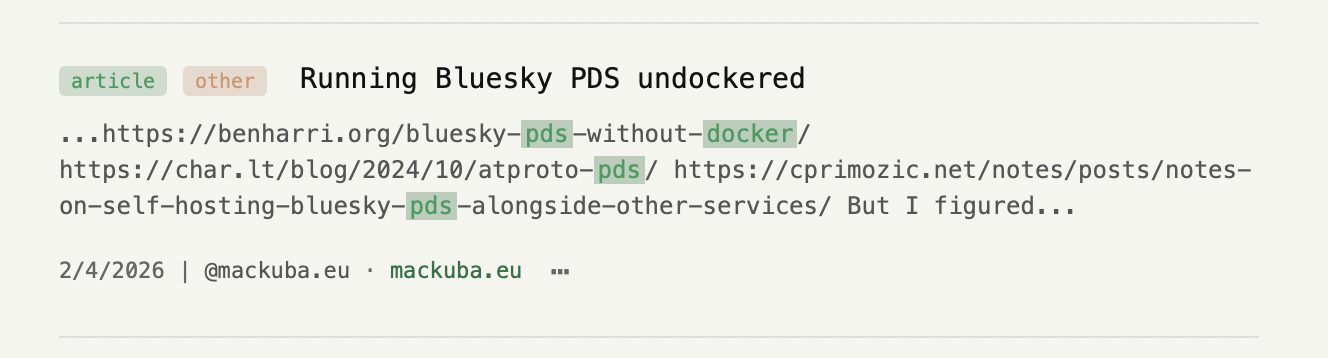
What does this give you? Any tool or service that somehow indexes this kind of records will also list your blog post. For example, there is a site pub-search.waow.tech which is like a standard.site search engine, and if you type “pds docker” into the search, you can find my blog post from this blog there:
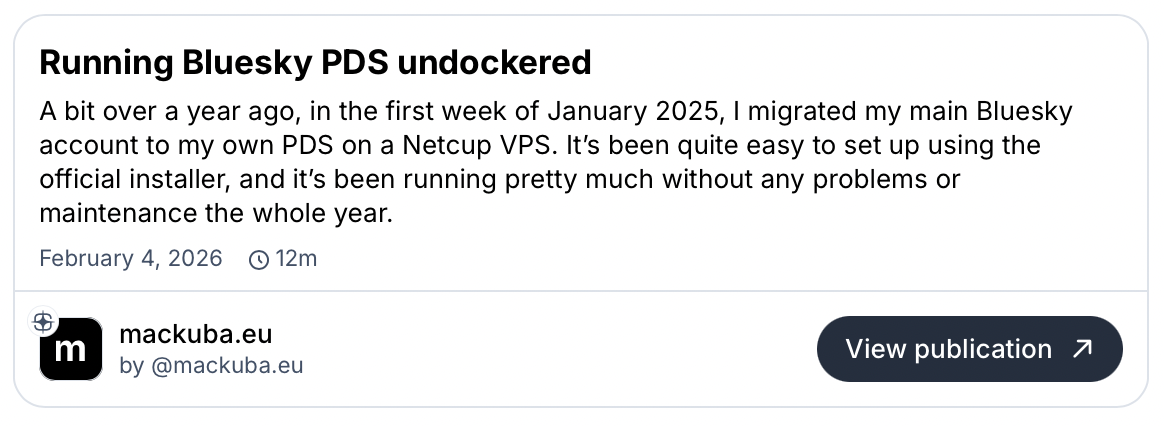
Bluesky will also display the embed card for such post with slightly expanded info, adding the blog title, author’s handle, publication date, and estimated reading time:
So how I did this: again, I have a Ruby script (in fact the same script that searches for Bluesky posts for the comment threads), and it looks up the “publication” record on my PDS and all matching “document” records connected to it. Then it goes through all blog posts, and basically does a diff: if the document record doesn’t exist, it creates it on the PDS, or if some of the fields differ vs. what’s in the file/database, it updates it on the PDS. The path field is used to identify the blog post records: a document record will have a field like "path": "/2014/10/06/a-guide-to-nsbutton-styles/", and I have a blog post locally that renders at this URL. The records with data and URIs are also saved to a local JSON file, which is used to add such <link> tags referencing the records in the blog post HTML’s head:
<link rel="site.standard.publication"
  href="at://did:plc:oio4hkxaop4ao4wz2pp3f4cr/site.standard.publication/3mn5mackuba26">
<link rel="site.standard.document"
  href="at://did:plc:oio4hkxaop4ao4wz2pp3f4cr/site.standard.document/3klx2pkb3k2ds">
If a blog post has an OpenGraph image assigned, the script also uploads the image to the PDS as a blob so it can be linked as a blob reference in the document record.
💬 You can add a comment here by replying to the post on Bluesky or Mastodon.